Do you need to generate cheque remittances according to the due dates on your invoices?
Would you like to automate this operation?
Use the "Cheque remittance" app to create remittance lists and generate cheque remittance PDFs.
Activating the app on your application allows you to record check payments for multiple invoices and generate a check remittance PDF.
Define payment by cheque on the invoice
On an invoice, in the "Payment schedule" block, select the "By cheque" payment method.
These invoices and their due dates can then be called up to compose a list and edit the corresponding cheque remittance.
Generate a check payment list
Go to the app's home page, and create a new list.
On the page entitled "Grouped cash receipts" :
- Give your list a name
- Select "Cheque" in the "Due date" field to designate the type of content called up.
- Call the content "sales" to designate documents such as invoices
- Set the date of the entries to be brought up (start and end of period)
- Confirm
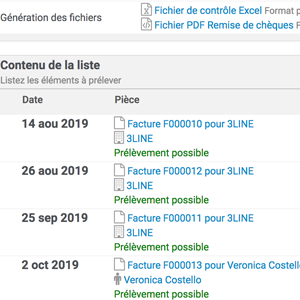
Click on the name of your "grouped collection" to display the content of the invoices concerned by payment by cheque.
Print cheque remittance
On the page containing the list of invoices subject to payment by cheque, click on the "Cheque remittance PDF file" link in the "File generation" field.
The check remittance PDF is generated.