Would you like to automate the costing of your products?
With the "Automatic cost calculation" app, weight your purchase price to instantly determine your cost price.
Refine your margin calculation by integrating unit costs for production, transport, logistics, sales, marketing, communication, etc., in addition to the purchase value.
Determine a weighting level representing these additional costs, for a product unit, as a percentage or as a value for each item, and automatically obtain your cost price calculation.
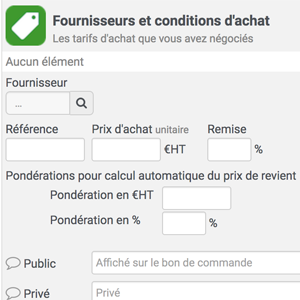
Activating the app adds two new fields to the "Suppliers and purchasing conditions" block of the product sheet at the time of purchase:
- Currency weighting
- Weighting in
The values in this field are valid for 1 purchase unit.
1. Setting the cost price
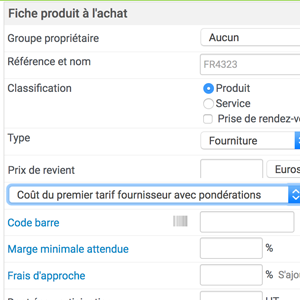
L’activation de l’app ajoute, sur les fiches produits, un nouveau champ, de type liste déroulante, qui permet de choisir le “Prix de revient” :
- Manual (free input by user)
- Calculated on the basis of the 1st supplier price (the first supplier price is used as the reference for calculating the cost price, with or without weighting).
- Calculated on the basis of components (current mechanism for compound products)
Select the calculation configuration for your product on each product sheet.
2. Automatic cost price calculation
Depending on the setting option selected on the product sheet, a different calculation mode will apply.
If you opt for :
- Manuel : utilisation standard. La saisie du prix de revient est Manuelle. Aucun calcul.
- Calculated according to the 1st supplier tariff : the cost price is calculated as follows:
Cost price = 1st supplier rate + [€ amount entered in the "€ weighting" field] + [€ amount weighted according to the % entered in the "% weighting" field].
If "Weighting €" is empty, then Prix de revient = 1er tarif frs + "Weighting %"
If "Weighting %" is empty, then Prix de revient = 1er tarif frs + "Weighting €"
If both "Weighting" fields are empty, then Prix de revient = 1er tarif frs.
- Calculated according to components: Same as above, but only applicable if the product is a composite product. The product cost price is equal to the sum of the component cost prices.
3. Import weights
The weighting information can be imported, via the product catalog import, by integrating the two new columns above into your file.
- Purchase: currency weighting
- Purchasing: weighting
The values contained in these two fields will fill the corresponding fields when the line is imported.